Pages

Showing posts with label professional development. Show all posts

Monday, May 8, 2017

Hyper about HyperDocs


http://hyperdocs.co/ 
I'm using this tomorrow!

These are my favorite words to hear during a professional development workshop. When I hear this, I know I have shared something with teachers that is relevant, applicable and scalable. I also wasn't surprised to hear this during a workshop in which we used a HyperDoc as our main tool.

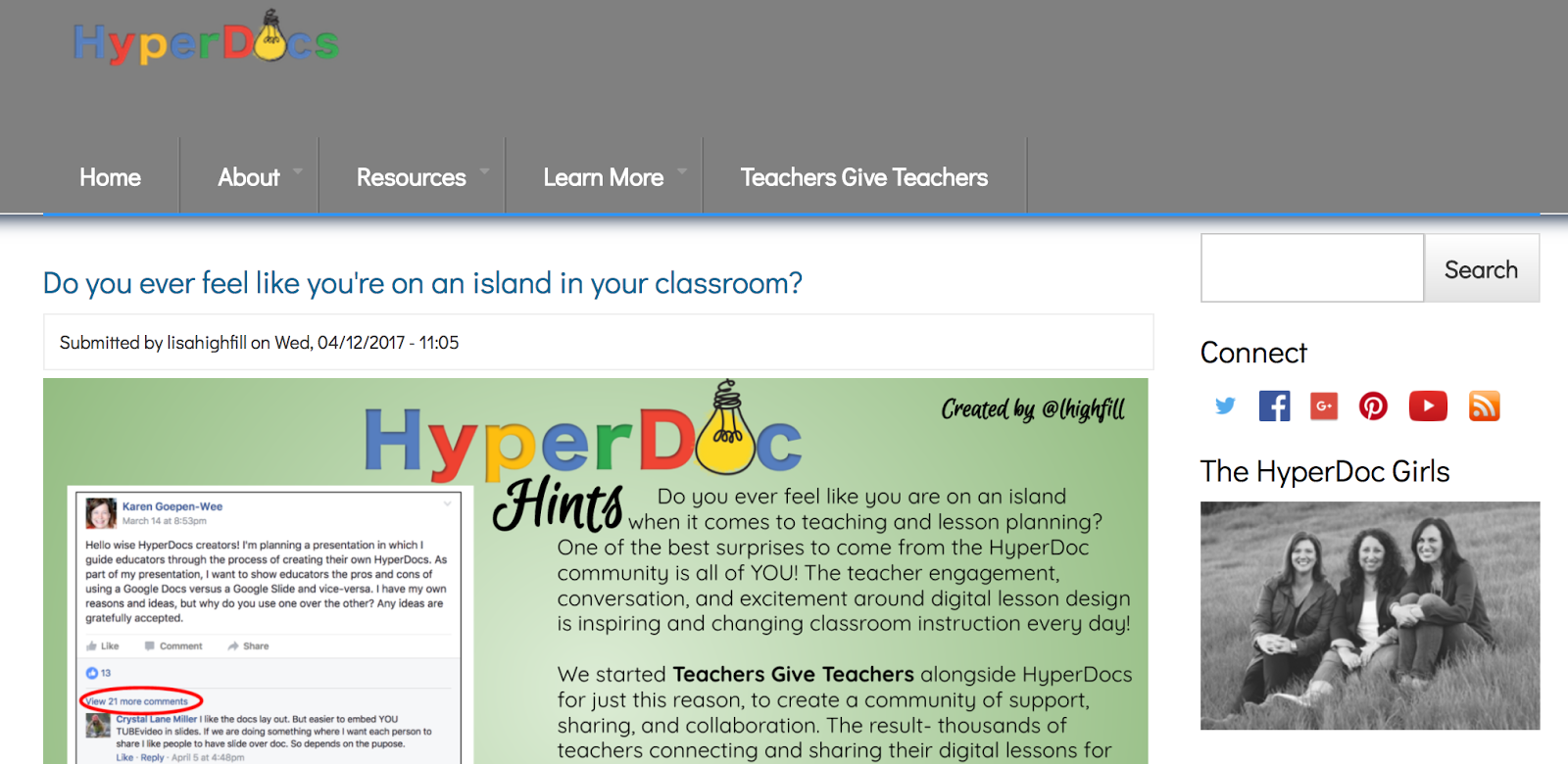
If you haven't checked out HyperDocs from Lisa Highfull, Kelly Hilton, and Sarah Landis, you definitely need to. On the surface, HyperDocs are Google Docs that are visually attractive and provide links to users to different information. But at their heart, HyperDocs are a student-centered, constructivist approach to using technology for student-driven learning. HyperDocs are organized with key words that invite users to be active members in their learning. The Google Docs are framed around verbs like: Engage, Explore, Explain, Apply, Share, Reflect and Extend. The "Engage" section might have users watch a video that sparks their curiosity. The "Explore" links might lead to websites that have further explanation about a topic. "Explain" might ask students to make their own video or voice recording about what they have learned or this might even be a face-to-face component of the lesson where students are asked to turn and talk to one another. As the verbs get more interactive in nature, there are more opportunities for student creation of products and collaboration among students. I particularly like the "Extend" idea which gives students that are really intrigued by the topic further opportunity for exploration.


Templates: http://hyperdocs.co/templates 
In the professional development workshop that I was co-leading, we created three different HyperDocs using one of the amazing templates available on the HyperDocs site. The workshop was about differentiation so we had teachers self-evaluate and choose a HyperDoc based on their knowledge and use of stations for differentiation. Teachers then used this HyperDoc to organize their learning for the session. In our case, each step in the HyperDoc was also a station and we asked teachers to physically move as they completed each step. This was useful for pieces of the HyperDoc that involved physical things (like manipulatives) and for promoting group discussion. Using the HyperDocs kept learners on track and clear in the steps they needed to take. The HyperDocs kept all the links in one place so there was no confusion about "where to go" for certain activities. And, above all, it ensured that our learning was student- (or in this case teacher-) centered and active. We did not stand and deliver a lesson on differentiation, teachers experienced a differentiated lesson and the HyperDocs helped us manage it.

Since that day, I have had numerous teachers share that they have moved to the HyperDoc as a way to organize their instruction. I love that this resource has thoughtful and intentional pedagogy embedded in it. While I'm sure some teachers can adapt a HyperDoc to make it just an electronic worksheet, I think the way Lisa, Kelly and Sarah have created and organized the HyperDocs really lure all teachers into crafting a more student-centered and activist approach to learning. I found it to be simpatico with my creed of Ask, Create, Play, Solve, Share. I believe that just seeing the examples on the HyperDoc Girls website, encourages teachers to think more about what the students are doing and less about what they as teachers will be saying. Their excellent book and website both have loads of tips and background about their thinking behind HyperDocs that are worth checking out. Let me know how you are using HyperDocs in your school. I, for one, am thrilled with a tool that is easy-to-use and has meaningful instruction at its center.


Friday, February 20, 2015

Most powerful PD strategy? Let teachers share

I am so lucky to have a job where I get to shape professional learning experiences for teachers. One of the programs I get to work on is something our school division calls Teacher Leadership Program (TLP). I'll save the full details of TLP in another post but today I want to talk about one thing we do at every meeting that I think has the biggest impact on participants' teaching and learning.

We let teachers share.


It is pretty simple. We set aside 30-40 minutes of our session (whether two hours after-school or an all day workshop) and ask 4-5 teachers if they'd be willing to share something they've tried in their class since last time we've met. Usually one of the facilitators already knows something fabulous that has been going on, but sometimes we ask not knowing exactly what they'll end up sharing. Each of the sharing teachers then sits at one table in our meeting room and the other teachers gather around them. The sharing teacher talks about what they tried, how it went, why they did it, what worked, what didn't and what they'd like to try next. The other teachers get to ask lots of questions. This whole process takes about seven minutes. A timer goes off and the listening teachers rotate to another sharing teacher. The sharing teacher repeats his or her mini-talk to the next group of teachers. Repeat until all teachers have had a chance to meet with all sharing teachers.

This is always the most exciting part of any meeting.


It is unbelievable listening to teachers talk about how they planned a lesson: what they considered when planning (Special Education, English Language Learners, Honors students, time, resources, student interests), how they organized their classroom, what order they chose to do activities in. And then hearing them describe what the kids got out of it: Joey finally spoke up, Jose laughed out loud, Norhan showed leadership, Emily really knows how to add fractions now. And then reflecting on how it went: next time I want to add sound, next week we'll try again with headphones, next lesson I want to preteach the vocabulary. Teachers think about so much all day long and have such great insights about what is happening in their classroom. And it is wonderful hearing how real kids are impacted by the strategies teachers are trying.

Listening to teachers' share their reflections is precious.


I also love hearing the questions the listening teachers ask. Did any kids get lost? How long did it take you to make this? What did your principal say? You can learn a lot from what the teachers are asking as well. It is also great to hear the praise they give each other. This is such a good idea! Do you mind if I try the same thing? Could you share your graphic organizer? I'm so excited to see this lesson!

Giving teachers a chance to show leadership benefits all.


The name of this professional development series is called Teacher Leadership Program so we do try to keep the leadership component in the front of our mind when planning. These sharing sessions are often the first step for teachers to see themselves as leaders. They realize that they have something valuable to share. They experience that sharing with other teachers can be fun and rewarding. They are encouraged to keep trying new things in their classroom. These quick, informal sharing sessions become a stepping stones for sharing at grade level meetings, faculty meetings and the division-wide technology gallery walk we host every spring. Many teachers catch the presentation bug and begin a blog or apply to present at conferences.

And I get new ideas!!


One of my other favorite benefits of these sharing sessions is that I get new ideas about how technology can be used in the classroom. Yesterday, I saw a teacher use Aurasma to have a students' mom remind him to do his homework (Ha! I never would have thought of this). Another teacher used Symbaloo to share Spanish resources for dual-language teachers (Perfect! So useful!). Another teacher had students do a practice run of peer-editing in Google Drive (Brilliant!). These sessions also give me a wealth of ideas to share with other teachers and to try myself.

I never would have heard any of this if I spend the whole session talking.


It is tempting to spend professional development teaching new strategies or showing off new digital tools. There is so much to show! So many important ideas behind good technology integration! But I have learned that setting aside this teacher sharing time develops more in a teacher than listening to me. So I will keep doing this. I will make sure I put my teachers first and let them lead sessions, share what they are trying and encourage them to do so with larger and larger audiences.

-------------------------------------------------------------------
I would love more ideas about how to incorporate teacher sharing in professional learning - if you have thoughts, please share!

Wednesday, November 5, 2014

What a Skitch!

One of the great things I get to do at my job is to facilitate a teacher-led professional development series called TLP-C. Basically, we meet online monthly and teacher shares a cool tool they've tried in the classroom. We learn a bit about the tool, hear about how the lesson went, talk about advantages and disadvantages and share ideas about integration. It is a great low-key, high-impact professional experience.

Below is a summary of our October session that can also be found at: http://blogs.acpsk12.org/tlpc/2014/11/05/what-a-skitch/

A big thank you to Lois Lansing, 3rd grade teacher from MacArthur Elementary School, for sharing how she has used Skitch in the classroom. It was so helpful to hear her ideas about how she used Skitch and to listen to stories from her classroom. If you missed our live session, you can watch the recording by clicking right here:
http://blogs.acpsk12.org/tlpc/files/2014/11/erosion1-2k4lrdz.jpg
Recording of TLP-C Skitch Lessons You Can Use October 30, 2014

Skitch is an app as well as a desktop application that allows you to annotate images   with captions, arrows, and other drawing tools. This is a great tool for anytime you want students to show what they know about an image. And, it is a great tool for app-smashing because the images you annotate in Skitch can be pulled into other apps or software or websites to create awesome digital stories and presentations.
erosion2

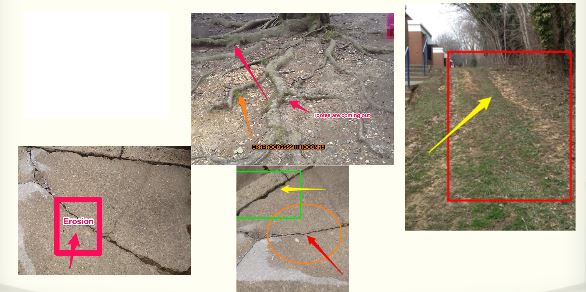
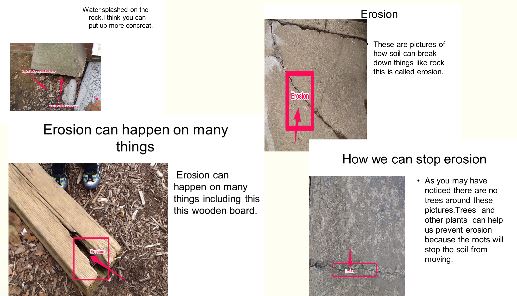
Lois shared a wonderful lesson she did when she was a 2nd grade teacher. After spending a few days learning about erosion, students were charged with the task of identifying erosion around their school building. Students then used Skitch to annotate those pictures: using arrows to draw attention to what they saw, using text boxes to explain what they saw and using other drawing tools (circles, squares) to highlight these examples of erosion. Next, Lois had the students import their Skitch images into PowerPoint to make recommendations about what the school should do to improve the school and slow down the erosion.

As we discussed using Skitch, we talked about some good tips like:
  • giving students some “play” time to take selfies and learn the Skitch tools
  • be clear about expectations if taking iPads outside
  • have iPads set up to email images to teacher to use the images with other applications on the computers OR set up Dropbox accounts on iPads for image sharing
  • partner students to promote collaboration
text-mark-up

Another great tip Lois shared was that you can use the blurring tool in Skitch to blur students faces. So if you want to post public pictures of students but don’t want them to be identifiable, you can use this helpful tool to do so!

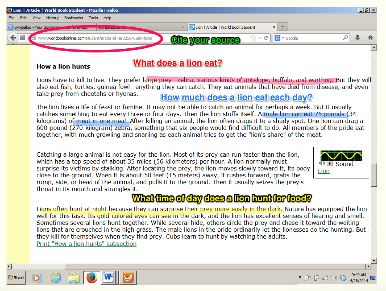
Lois shared another fantastic way to use Skitch which is for highlighting text features. This was a really neat idea where students could highlight topic sentences, add questions they have, or even point out citation information like the URL for the website. More ideas that were shared were:
  • let the students take the selfies and then label (eyes, ears, nose) in a target language (Spanish, French, Chinese, etc.)
  • take pictures of student artwork and have students label skills they are working on (perspective, lines, negative space, etc.)
  • have students make addition stories using counting bears and use Skitch to explain the addition
  • take pictures of primary sources or maps and have students label important items
Have your own ideas about using Skitch or questions about how to use Skitch? Leave a comment below!!


Thursday, March 14, 2013

Final Session of Virtual Book Club - How will you "Rock the World?"

Our final session of Virtual Book Club discussing Flattening Classrooms, Engaging Minds by Julie Lindsay and Vicki Davis is already this Monday, March 18th at 7:30pm EST (that’s Tuesday, March 19th at 12:30am GMT)! For your time zone, click here. We will be discussing Chapter Twelve - Rock the World!

Use this link (https://sas.elluminate.com/m.jnlp?sid=2007066&password=M.065891D192F8072208BF5756999CE0) to log onto the live session or watch this space for a posting of the recording afterwards.

I can't believe it is our final session. This Virtual Book Club has been a wonderful space to connect with educators from all levels that are passionate about their work, are life-long learners, and are willing to share all they know as well as question what they are still learning about.

As I plan for the final session, I am looking for any remaining questions that we haven't addressed yet. Please take a moment to leave a comment on this blog with topics you would like to see covered in the last session. Whether it is a question you have about how global projects work, ideas about how to set up rubrics for collaborative projects, challenges using wikis or blogs, or comments about the value of connected learning, let me know so that we can take some time on this last day to chat and reflect on the subjects that are important to you.

If you missed the session last week, listen to the most recent recording here: Virtual Book Club March 4th/5th and please share your thoughts on this blog: Virtual Book Club. Our focus was Chapter Nine - Celebration and Chapter Ten Designing and Managing a Global Collaborative Project.
I think the big themes of the session were these:
  • Find as many opportunities as possible to give students feedback about their work, whether it is an awards ceremony gala, a carefully written note or just pulling chairs into a circle to talk. Kids are starved for feedback - feed them!
  • Be creative when thinking about time and space - using Skype, VoiceThread or Blackboard Collaborate might allow experts, parents or other teachers to be a part of your celebration.
  • Take time to reflect and celebrate projects as a professional. Whether it is privately, publicly, online or face-to-face, take a breath and consider what worked well and what you want to repeat.
  • Start somewhere with a global project - join one that already exists, start with a teacher you know in another place, plan your own, but START.
And if you are just finding us in time for this last session, please feel free to drop in! We welcome all educators that want to learn more about global projects or share what they have already learned.
Hope to "see" you there!

Monday, March 4, 2013

Meeting #5 of Virtual Book Club - How do you celebrate?

I can't believe our 5th meeting of the Virtual Book Club discussing Flattening Classrooms, Engaging Minds by Julie Lindsay and Vicki Davis is already this Monday, March 4th at 7:30pm EST (that’s Tuesday, March 5th at 12:30am GMT)! For your time zone, click here. We will be discussing Chapters Nine and Ten – Celebrating, Designing, and Managing Global Collaborative Projects.
Add your voice to our group! Use this link (https://sas.elluminate.com/m.jnlp?sid=2007066&password=M.065891D192F8072208BF5756999CE0) to log onto the live session or watch this space for a posting of the recording afterwards.

I am really looking forward to sharing ideas about how to best celebrate student projects. This is a weak point of mine so I'm excited to review the ideas in Chapter Nine with teachers. And I'm already thinking about how we can celebrate the closing of Virtual Book Club at the following meeting. Ideas welcome!

Chapter Ten also has so much rich material for discussion. This chapter really walks you through how to design and manage a global project. It will be so meaningful for our network of teachers to share what they have done that works, what new ideas they got from the book and what questions they still have.

Join us and add your expert or novice voice!

Monday, February 25, 2013

Ways to offer students choices was the theme of Session #4 of the Virtual Book Club! If you weren’t able to join us, listen to the recording here: Virtual Book Club Feb 18th/19th and please share your thoughts on this blog: Virtual Book Club. We have been reading and discussing Flattening Classrooms, Engaging Minds by Julie Lindsay and Vicki Davis  and our focus this time was Chapter Seven (Choice) and Chapter Eight (Creation).

We began with some great comments:
http://mrg.bz/Bo0JPI
  • @Durff shared that she tells students on 1st day that they are all intelligent (Gardner), it is her job to find out how to make them shine
  • Jim shared that he believes teachers should be helping students learn, not giving them the answers
  • Laurel mentioned that some students need content delivered directly from teachers before they are able to make choices in the classroom (and shared an interesting book: Why Students Don't Like School?)
  • Monica added that she likes to model how she learns so that students feel comfortable making mistakes in her classroom
We also struggled with considering how teachers can create choices in the classroom in a time of standardization and high-stakes testing (at least in the United States).
  • Paul shared that part of personalizing the classroom is establishing relationships with students - it isn't just about content, it is about connecting
  • Michelle talked about the need to let teachers have choice as well - when something is working, having the freedom to pursue it, not have to stay lock-step with a scripted program
  • Elena introduced the idea "of individual teachers being 'experts' with specific tools and working collaboratively with their peers is a more manageable and realistic approach for interdisciplinary teams."
https://saveourrhinos.wikispaces.com/
We also shared our own struggles and challenges with creating and maintaining electronic spaces for learning with choice in mind. We all agreed that monitoring electronic spaces are difficult to maintain and that we would love to have ongoing eportfolios that follow students through their years of learning in a school (Google Sites, KidBlog, Evernote, Weebly and even PhotoStory were shared as ideas). We debated a bit about how to choose new tools - what is trendy, and what is trendy with a purpose? Paul raised a great point about involving students in planning electronic spaces and many shared stories about ways they've done this.  As part of this, we also wondered how to make sure more students have access to technology beyond the classroom.

From there, we talked about how to structure learning experience that offer students ways to make meaning. Rocky shared the idea of students meeting with teachers to create useful materials for them and Robyn shared a bit about a project her students are doing to save rhinos! Interestingly, we found we have less experience offering students chances to invent or build. It would be fun to talk more about how we could build these concepts into our teaching more.

We ended by trying out the break-out room feature in Blackboard Collaborate. I guess I modeled the idea of the "teacher" not being perfect but willing to take risks since I had no idea how it would work! :) Thanks to everyone who was there for humoring me and experimenting along with me.  I think we'll try these small groups again next time with a focus question. Big virtual hugs to @Durff for telling me more about how to use this effectively at future sessions. And my apologies for those of you listening to the recording since there will be a long pause when you are listening (another important aspect of this tool for me to understand!).

Thank you again for everyone that participated. I'm reminded of the quote by C. S. Lewis cited on page 34 of this book:
The next best thing to being wise oneself is to live in a circle of those who are.
Thank you for being in my circle and adding to my wisdom! And to Mara for agreeing to co-moderate. If anyone is interested in co-moderating next time, please leave a comment or send me an email, I'd love your help!

Our next meeting will be Monday, March 4th at 7:30pm EST (that’s Tuesday, March 5th at 12:30am GMT). For your time zone, click here. We will be discussing Chapters Nine and Ten - Celebrating, Designing, and Managing Global Collaborative Projects. Hope to “see” you there!

Monday, February 18, 2013

Meeting #4 Virtual Book Club - Add Your Voice!

Looking forward to our fourth meeting of the Virtual Book Club discussing Flattening Classrooms, Engaging Minds by Julie Lindsay and Vicki Davis Monday, February 18th at 7:30pm EST (that’s Tuesday, February 19th at 12:30am GMT). For your time zone, click here. We will be discussing Chapters Seven and Eight.

Add your voice to our group! Use this link (https://sas.elluminate.com/m.jnlp?sid=2007066&password=M.065891D192F8072208BF5756999CE0) to log onto the live session or watch this space for a posting of the recording afterwards.

We have had some powerful conversations so far about digital citizenship (see The Making of Digital Citizens), building and maintaining a Personal Learning Network (see Launching into a River of Information), and starting and joining global project (see The Virtual Book Club Has Launched).

This is a community of teachers sharing with teachers: reflecting, listening, sharing, questioning. Join us!

Tuesday, February 5, 2013

The Making of Digital Citizens

What a rich discussion we had last night during Session #3 of the Virtual Book Club! If you weren’t able to join us, listen to the recording here: Virtual Book Club Feb 4th/5th and please share your thoughts on this blog: Virtual Book Club. We have been reading and discussing Flattening Classrooms, Engaging Minds by Julie Lindsay and Vicki Davis  and our focus this time was Chapter Five (Digital Citizenship) and Chapter Six (Contributing and Collaborating).

We confessed, bragged, questioned, shared tips and traded resources on the topic of Digital Citizenship. It seems there is always more to consider from using images in our presentations to setting our privacy settings but we all agreed that we need to model strong digital citizenship for our students and explicitly teach them how to be a thoughtful contributor in the digital world.
  • Connie shared "Just as we model and teach ways to effectively present and collaborate in face to face groups, digital citizenship is just another layer."
  • Joseph agreed and asked, "Students need to understand that there are differences in communicating on facebook, twitter with friends versus using this type of media in school...but how to teach?"
  • Elena commented, "It[digital communications] also provides an opportunity to evaluate how we interact with each other face to face. Sometimes in the middle school environment, speaking to others with a certain tone or attitude can become the norm."
  • Amy agreed, "Not only do we need to relate to our students using technology but we need to teach them how to communicate in positive ways using technology"
Some of the great resources that were shared to help with teaching digital citizenship were:
Some tips given about getting students to care about digital citizenship:
  • Use real-life examples (read Chris' story here) and facts (thanks to Laurel for sharing that 70% of employers look at digital footprints)
  • Have students create Digital Citizenship materials (Digiteen and Digital ID are examples)
  • Provide an authentic audience (when students see that others are actually reading/listening/watching their work, they care more)
  • Make it easy for students - provide them with music and images that they can use
  • Model by adding the URL for photos within classroom presentations
  • Use your librarians! They often have lessons ready to go on this topic
  • Start with a private wiki or an Edmodo class where you can monitor and give feedback to students before collaborating with another classroom.
  • As Rocky has done, actually contact authors and artists to request permission to use their materials. (Read more about what Rocky has done here)
We wrapped up by sharing a bit of advice about getting started with global projects and we all got really excited about trying Mystery Skype. And, as usual, the time flew by. I never knew an hour could pass so quickly!

A huge thank you to Vicki Davis for joining us in between prom planning and Flat Certified teacher training. Your professional generosity is unending. Another thank you to Jim for picking up as co-moderator. It is so helpful to know someone else is listening, reading, typing and talking as fast as I am! And a thank you to all the busy educators who took time out to share, question, and connect.

I'm looking forward to our next meeting on Monday, February 18th at 7:30pm EST (that’s Tuesday, February 19th at 3:30am GMT). For your time zone, click here. We will be discussing Chapters Six (Choice) and Seven (Creation).

Monday, February 4, 2013

Session #3 - Virtual Book Club - Join the conversation!

Our next meeting of the Virtual Book Club, discussing Flattening Classrooms, Engaging Minds by Julie Lindsay and Vicki Davis, will be Monday, February 4th at 7:30pm EST (that’s Tuesday, February 5th at 3:30am GMT). For your time zone, click here. We will be discussing Chapters Five and Six.
Join the conversation! Use this link (https://sas.elluminate.com/m.jnlp?sid=2007066&password=M.065891D192F8072208BF5756999CE0) to log onto the live session or watch this space for a posting of the recording afterwards.

Thursday, January 24, 2013

Launching into a River of Information

We had a wonderful second session of the Virtual Book Club discussing Flattening Classrooms, Engaging Minds by Julie Lindsay and Vicki Davis,.  Our focus this time was Chapter Three and Four which discuss ways teachers and students can connect and communicate with a global audience. If you weren't able to join us, listen to the recording here: Virtual Book Club Jan 22nd/23rd and please share your thoughts on this blog: Virtual Book Club.
We had fun exploring different social media tools that we each use to broaden our PLNs. Some of the tools that were highlighted were: Google Reader, Flipboard, Zite, Diigo, Twitter, LiveBinders, Scoop.It, Storify and two that were new to me: Paper.li and Feedly. We all agreed that these tools helped us curate the web and share what we are learning with others. However, we also discussed the feeling that as we reach out to take a drink from these nourishing waters, we are sometimes met with a firehose blasting back at us with an overload of information!
Suggestions for dealing with this "River of Information"
  • from Michael in Australia - "Follow Quality, Get Quality, Quality Beats Quantity." That might mean only following 4-5 blogs in your Google Reader or using hashtags to search in Twitter instead of following 1,000 people. (#globalclassroom, #flatclass, #sschat, #2ndchat were all mentioned)
  • from Flattening Classrooms, Engaging Minds by Julie Lindsay and Vicki Davis - designate two times a week where you read through posts and links for 15 minutes. Think of it as a PLN workout.
  • many thought that starting with Diigo was a good plan. Here two groups to follow: Flat Class Educator's Group and EdTechTalk.
  • from Sharon in Mumbai - don't suffer from FOMO (Fear of Missing Out). You can't read everything.  It is okay.
  • from Theresa in IL - sometimes you need to "Mark as Read" and move on. See above point about FOMO.
After sharing what the term "teacherpreneur" meant to us, we engaged in some thoughtful conversation about how to work with Standards, Administrators, Colleagues and Hardware limitations. There was definite collective agreement on the following:
  • "teacherpreneurs" can and should embrace state or national standards for their curriculum and expertly weave these in with innovative, collaborative projects.
  • reaching out to administration and colleagues is important and necessary for long-term sustainability of projects but it is hard and takes resilience
  • hardware might  not be exactly what you want, but make it what you need
  • connecting with other "teacherpreneurs" keeps you motivated and inspired. As Michael said:
when you are part of a community, you will surprise yourself. this is not something you need to do alone
Finally we talked about getting started with global projects. Here are some of the resources and projects mentioned. We will definitely talk more about these as the weeks go on. And remember to check out the numerous projects mentioned in the book!
Thank you to everyone who joined us or who has been posting on the blog. It is wonderful to hear and read the insights, doubts, mantras and beliefs of teachers who care about the work they do with students. Your students are lucky to have you!
Our next meeting with be Monday, February 4th at 7:30pm EST (that's Tuesday, February 5th at 3:30am GMT). For your time zone, click here. We will be discussing Chapters Five and Six. Hope to "see" you there!

Tuesday, January 22, 2013

Join us for Session #2 of Virtual Book Club!

I am looking forward to our next meeting IN A FEW HOURS, Tuesday, January 22nd at 7:30pm EST (Wednesday, January 23rd at 3:00AM GMT), for your time zone, click here. We had a great session two weeks ago and I am excited to hear thoughts from teachers about connecting and communicating with teachers around the world, being a "teacherpreneur," and advancing "technopersonal" skills of our students and ourselves.

To join us and discuss Chapter Three of Four of Flattening Classrooms, Engaging Minds by Julie Lindsay and Vicki Davis, please use this link: https://sas.elluminate.com/m.jnlp?sid=2007066&password=M.065891D192F8072208BF5756999CE0

If you missed the first session, no worries, the recording can be accessed here: Virtual Book Club January 7th

If you can't make the live event, share your thoughts with us on this blog! Click on the chapter you want to comment on and add your ideas, questions, connections and thought grenades!

Tuesday, January 15, 2013

Call for Proposals for Great Free, Online Conference

The FREE 4T Virtual Education Technology Conference will run from May 18th-May 21st.  There will be 45 workshops and breakout sessions on all aspects of technology in education.  This is a great conference hosted by University of Michigan School of Education graduate students. When they wanted to learn more about educational technology in their coursework, they put out the call to teachers world wide. The result is this excellent, free, online conference!

Last year I had the opportunity to present at the 4T Virtual Education Technology Conference on two topics: Digital Writing and Global Classrooms. It was a great experience with attendees from across the United States and around the world. It was also a great opportunity for teachers I work with to share the amazing things they are doing. We had fun doing panel presentations with each teacher taking about 10 minutes to share their lesson ideas and resources. This was a great introduction to online presentations for teachers. 
 
The 2013 4T Virtual Conference's Call For Presentation Proposals is now OPEN!  Consider presenting! The organizers were very helpful if the technology is new to you. Here is the link to make a proposal: https://sites.google.com/site/conference20122/to-dos  And follow them on Twitter or use this hashtag #4t2013

And if presenting isn't your thing, certainly register. The conference is free and they are providing free CEUs to participants. Register here:  https://sites.google.com/site/conference20122/project-definition I always learn the most from other teachers sharing what they are doing and a conference called "Teachers Teaching Teachers about Technology" is all about just that!

Tuesday, January 8, 2013

Virtual Book Club has Launched!

http://www.flickr.com/photos/horrigans/7562926268/
What an exciting start to the Virtual Book Club! If you couldn't attend live, here is the recording to the event: Virtual Book Club January 7th. Our next meeting will be Tuesday, January 22nd at 7:30pm EST (Wednesday, January 23rd at 3:00AM GMT), for your time zone, click here. Please note, this is a change from the original schedule.
We had over 30 teachers participating live from five countries and four continents and "a whole mess" of states across the United States. It was lively with a very active chat, loads of folks taking a turn at the microphone and more than a couple of technical glitches. Here are some highlights:
  • A huge thanks to Theresa Allen for co-moderating with me. She kept things rolling when my computer decided to challenge me and supported new-comers with Blackboard Collaborate tips and tricks.
  • Another big shout-out to Lisa Durff for setting up the Blackboard Collaborate room and checking in on us to make sure things were working, and for spreading the word about the club.
  • Big virtual hugs to Michael Graffin and other Global Classroom Project teachers for jumping in and sharing ideas and inspiration about how global projects can be tackled by anyone, anywhere.
  • Deep and heartfelt thinks to author Julie Lindsay for being a part of our first discussion. Your presence added depth and meaning to the conversation.
  • ACPS super-teachers that reached beyond their own comfort zone to try out new technology, shared their challenges, asked their questions, and connected easily and powerfully with educators around the world
  • Each educator that took time out of their busy lives to spend an hour sharing stories, connecting and lending their digital support to the concept and work of global projects. As we said last night "We might all be crazy, but this way we can be crazy together." *smile*
Highlights of the discussion:
  • Finding ways to show that all students, all ages can be empowered by and be powerful through global projects
  • Being creative with the technology that is available and maximizing what you have
  • Learning about successful projects that are already running and available to join
  • Thoughts about how to have global project running in many grades so that students have repeated exposure to the opportunities to collaborate across classrooms
  • Stages of global projects, from exchanging information between classrooms to have students co-creating with classrooms around the world
  • The challenges of researching global projects, specifically what needs to be measures in education and where higher ed is vs. K12 teachers
  • How global projects will continue to evolve with new technology
If you couldn't join us, we hope you can make it next time or leave some comments on this blog!

Saturday, January 5, 2013

Countdown to First Virtual Book Club Meeting!

The Virtual Book Club will begin a short 48 hours (-ish) from now! It has been so much fun to see folks begin to post on the Virtual Book Club blog, tweet comments on the book, email with ideas or even call when they had a question. One of the wonderful things about a global Professional Learning Network (PLN) is that you have colleagues and friends from all around the world sending you great snippets of wisdom and encouragement at all times of day. Thank you everyone for your active participation already!

If you haven't already, a quick reminder to make sure you computer is ready for our first session on Monday, January 7th, 7:30PM EST (that's Tuesday at 3:00AM GMT), for your time zone, click here. To check your computer, go to this page by Blackboard Collaborate, it lets you check your computer to make sure you have all the software you need.

The link you will need to join the session is: https://sas.elluminate.com/m.jnlp?sid=2007066&password=M.065891D192F8072208BF5756999CE0

Please plan on logging on 20 minutes or so before the start of the book club so that you can make sure all is working and complete the Audio Wizard before we get started. If you haven't used Blackboard Collaborate yet, you'll find it is a great tool and pretty easy to use, but you'll want some time to explore it before we get started.

Anyone who can't make our first meeting or has some ideas to share before then, feel free to begin commenting on Chapter One or Chapter Two. We have some folks from time zones that can't make the live meeting but will be following our conversation through this blog.

Tuesday, August 21, 2012

5 Great Educational Technology Blogs

http://www.flickr.com/photos/twentysevenphotos/5437365845/
Let me start by saying I love "top" lists. I'm the first to click on "11 ways to use Twitter in the classroom" or "15 rules to live by." Now that it is time for me to try to make a top 5 list of great educational technology blogs, I am feeling very inadequate and shy. But teachers and colleagues often ask me which blogs I read and so I'm feeling like it would be a good idea to post some of my favorites here. I cover everything from tech tools, to teacher reflections to posts that challenge the status quo. I find I need all of these popping up in my Google Reader to keep me thinking about my work and working on my thinking. And really, there are so many wonderful blogs out there, this is really just a starting point:

Cool Cat Teacher - Vicki Davis's blog is everything I appreciate: current, humorous, sincere, authentic, inspiring. Her blog is filled with great resources and great tools. A first stop for teachers wanting to learn more about what technology to use, how to use it and why to use it!

Kathy Schrock's Guide to Everything -  Kathy Schrock is legendary in the Ed Tech realm. She finds great tools, communicates them well, and keeps current on what is shifting and changing in education. This is a great spot to find just about anything you are looking for in terms of best practices and educational technology.

The Global Classroom Project Blog - I am partial to this blog because I have had the chance to guest blog on it (full disclosure). But what I love about it is just that, it is filled with different teachers from around the world sharing what they have tried in their classrooms, what is working, and what challenges they still face. While not strictly and educational technology blog, most of these projects that are described, use technology in some innovative way - getting students to connect, learn and work together across time zones, borders and oceans.

Free Technology for Teachers - Richard Byrne's blog is chock-full of reviews of all kinds of apps, software, web 2.0 tools and more. This is a great stop-off if you want to learn 5 new storytelling apps or the best video-editing software.

http://www.flickr.com/photos/leehaywood/4295780055/
Okay, so maybe I'll do my top six.... *smile* These last two are my reality check blogs. These two thought leaders consider the big picture and ask what learning should really be about.

Dangerously Irrelevant - This is one of the first blogs I began subscribing to and Scott McLeod was one of the first people I began following on Twitter. His posts make me think. They challenge the traditional way of teaching and learning many of us experienced and asks powerful questions that make me reconsider what classrooms should look like. I don't always agree and sometimes it shakes my thinking too deeply, but I know I need these ideas to shape what I do and what I believe.

The Innovative Educator - It took me longer to find Lisa Nielsen but her posts serve a similar place in my professional learning and growth as do Scott McLeod's. She really pushes the envelope in terms of questioning what schooling is about and how it relates or doesn't relate to learning and education. I encourage you to check her out.


Saturday, May 19, 2012

Teachers Teaching Teachers About Global Projects


What a great name for a virtual conference, TeachersTeaching Teachers about Technology! This conference title spoke to me immediately. This is exactly the kind of collaborative climate I try to create in my own work with teachers, and here was a virtual conference I could participate in that would expand the circle of teachers teaching each other to a national and global level. And, if you've read The Best Conference I Ever Attended Without Leaving My House, you know my love for online conferences. Here was a chance for me to give back by sharing a topic I'm passionate about! I quickly tweeted my #globalclassroom tweeps and asked who else would like to co-present about The Global ClassroomProject.

Two great colleagues jumped on it: @tdallen5 and @Elle_Gifted. We co-wrote the presentation over Google Docs, not the least deterred that we lived in three different states: Virginia, Illinois, and Mississipi. I also contacted some teachers I’m lucky enough to work with in my own school division (http://mskcherry.weebly.com/ and http://communicationandrelationships.weebly.com/) to see if they could participate as well and speak first-hand about their experiences with global learning projects. Despite calling @tdallen5 an hour earlier than she was expecting me once (darn those time zones!) and at least one teacher being thwarted from participating by state testing, we are set to present Tuesday, May 22nd at 2:30pm EST. And, of course, none of that would have been possible without the help of @mgraffin who not only connected us in the first place, but proofed our presentation and helped us connect with even more resources!

In addition to loving the fact that putting together this presentation was in itself a global project, it was a great chance to reflect again on why I am so passionate about global projects. Listening this past Thursday to one teacher practicing online with the moderator (in Michigan), I was reminded how much we have to gain by letting students communicate with their peers around the world.

Communicating with others fosters self-reflection

  • American students were stunned to learn that their friends and Hong Kong were planning to study over their winter vacation
  • Two girls connected about how hard it is to change when you get headed down the wrong track

Students rise to the occasion when there is an authentic audience

  • English Language Learners in the United States practiced their speeches over and over again to make sure that their friends in Hong Kong could understand them
  • Students revised their “finished” writing when they knew students elsewhere would be reading and listening to their work

Teachers grow from global collaboration too

I am so grateful to Global Classroom Project for:
  • helping me create a PLN where I can send out a tweet and end up presenting with peers across the country in a virtual conference
  • providing a place where teachers can create their own project and connect with teachers across the world
  • keeping me motivated and inspired to make global project a part of as many classrooms as I can

And, finally, for helping teacher teach teachers about global projects!