Pages

Showing posts with label share more stories. Show all posts

Monday, June 22, 2015

Storytime with StoryKit

Sometimes the simplest apps can make the most powerful lessons.

A few weeks ago, I was brainstorming a lesson with a 7th grade Life Science teacher at my school. She had a unit on symbiosis coming up and she wanted to assess the students in a new way. We bounced around a lot of ideas: green screens, music videos, cartooning sites but what we landed on was StoryKit. StoryKit is a free app from the folks at the International Children's Digital Library (which is a great resource in itself if you aren't already familiar with it!).

StoryKit lets you create a digital book. For images, you can draw your own, import from the web or use your camera roll. You can simply add text with a text box. You can arrange and format the images and text as you like. A great feature of StoryKit is that you can add audio. Just click and record yourself reading the story out loud. You can even record word by word or sentence by sentence! This was just what we were looking for, a tool that let's the students' creativity shine without too many features or distractions in the creation. And... and.... what if we planned on reading the stories to an 2nd grade class at a nearby elementary school?

My job was to introduce the tool which was easy because StoryKit is so intuitive. I just walked the kids through the features and made a silly story as a sample. Students literally had no technical questions or problems. If there weren't sure how to do something, they quickly figured it out or asked a friend. It was seamless.

Their stories were fantastic. The teacher assigned a symbiotic relationship to each group of students. The task for the group was to write a children's story that told a story about that relationship. She made a model first to show them and reinforced Language Arts skills by using the same story graph that their Language Arts teacher had used with them earlier. Kids came up with adorable ideas and clever plot twists to demonstrate what they knew about symbiosis. And the best stories would go in person to an elementary school to read to a class. Here are a couple of my favorites:

Sloth and Algae Reunite
Lola and Charlie
Sandy and Randy's Adventure: Lost at Sea

I might have loved these stories, but the 2nd graders loved them even more. We had a great morning where the 7th graders first had to explain the four types of symbiotic relationships in 2nd grade terms (smiley faces did the trick) and then read their stories in small groups. The 2nd graders learned so much - they could identify the type of relationship in every story. And the 7th graders learned so much - how to explain what they know in a compelling, interesting and memorable way.

What I learned from this lesson:

  1. The simplest apps are often the best
  2. Having a real audience for school work results in better school work
  3. Asking students to explain what they know in simple terms demonstrates whether they know or understand an idea
  4. 7th graders are their best selves for 2nd graders
  5. Kids learn when we tell and share stories
And guess what app the 2nd graders asked to use next time they could use iPads?

Friday, February 20, 2015

Most powerful PD strategy? Let teachers share

I am so lucky to have a job where I get to shape professional learning experiences for teachers. One of the programs I get to work on is something our school division calls Teacher Leadership Program (TLP). I'll save the full details of TLP in another post but today I want to talk about one thing we do at every meeting that I think has the biggest impact on participants' teaching and learning.

We let teachers share.


It is pretty simple. We set aside 30-40 minutes of our session (whether two hours after-school or an all day workshop) and ask 4-5 teachers if they'd be willing to share something they've tried in their class since last time we've met. Usually one of the facilitators already knows something fabulous that has been going on, but sometimes we ask not knowing exactly what they'll end up sharing. Each of the sharing teachers then sits at one table in our meeting room and the other teachers gather around them. The sharing teacher talks about what they tried, how it went, why they did it, what worked, what didn't and what they'd like to try next. The other teachers get to ask lots of questions. This whole process takes about seven minutes. A timer goes off and the listening teachers rotate to another sharing teacher. The sharing teacher repeats his or her mini-talk to the next group of teachers. Repeat until all teachers have had a chance to meet with all sharing teachers.

This is always the most exciting part of any meeting.


It is unbelievable listening to teachers talk about how they planned a lesson: what they considered when planning (Special Education, English Language Learners, Honors students, time, resources, student interests), how they organized their classroom, what order they chose to do activities in. And then hearing them describe what the kids got out of it: Joey finally spoke up, Jose laughed out loud, Norhan showed leadership, Emily really knows how to add fractions now. And then reflecting on how it went: next time I want to add sound, next week we'll try again with headphones, next lesson I want to preteach the vocabulary. Teachers think about so much all day long and have such great insights about what is happening in their classroom. And it is wonderful hearing how real kids are impacted by the strategies teachers are trying.

Listening to teachers' share their reflections is precious.


I also love hearing the questions the listening teachers ask. Did any kids get lost? How long did it take you to make this? What did your principal say? You can learn a lot from what the teachers are asking as well. It is also great to hear the praise they give each other. This is such a good idea! Do you mind if I try the same thing? Could you share your graphic organizer? I'm so excited to see this lesson!

Giving teachers a chance to show leadership benefits all.


The name of this professional development series is called Teacher Leadership Program so we do try to keep the leadership component in the front of our mind when planning. These sharing sessions are often the first step for teachers to see themselves as leaders. They realize that they have something valuable to share. They experience that sharing with other teachers can be fun and rewarding. They are encouraged to keep trying new things in their classroom. These quick, informal sharing sessions become a stepping stones for sharing at grade level meetings, faculty meetings and the division-wide technology gallery walk we host every spring. Many teachers catch the presentation bug and begin a blog or apply to present at conferences.

And I get new ideas!!


One of my other favorite benefits of these sharing sessions is that I get new ideas about how technology can be used in the classroom. Yesterday, I saw a teacher use Aurasma to have a students' mom remind him to do his homework (Ha! I never would have thought of this). Another teacher used Symbaloo to share Spanish resources for dual-language teachers (Perfect! So useful!). Another teacher had students do a practice run of peer-editing in Google Drive (Brilliant!). These sessions also give me a wealth of ideas to share with other teachers and to try myself.

I never would have heard any of this if I spend the whole session talking.


It is tempting to spend professional development teaching new strategies or showing off new digital tools. There is so much to show! So many important ideas behind good technology integration! But I have learned that setting aside this teacher sharing time develops more in a teacher than listening to me. So I will keep doing this. I will make sure I put my teachers first and let them lead sessions, share what they are trying and encourage them to do so with larger and larger audiences.

-------------------------------------------------------------------
I would love more ideas about how to incorporate teacher sharing in professional learning - if you have thoughts, please share!

Wednesday, November 5, 2014

What a Skitch!

One of the great things I get to do at my job is to facilitate a teacher-led professional development series called TLP-C. Basically, we meet online monthly and teacher shares a cool tool they've tried in the classroom. We learn a bit about the tool, hear about how the lesson went, talk about advantages and disadvantages and share ideas about integration. It is a great low-key, high-impact professional experience.

Below is a summary of our October session that can also be found at: http://blogs.acpsk12.org/tlpc/2014/11/05/what-a-skitch/

A big thank you to Lois Lansing, 3rd grade teacher from MacArthur Elementary School, for sharing how she has used Skitch in the classroom. It was so helpful to hear her ideas about how she used Skitch and to listen to stories from her classroom. If you missed our live session, you can watch the recording by clicking right here:
http://blogs.acpsk12.org/tlpc/files/2014/11/erosion1-2k4lrdz.jpg
Recording of TLP-C Skitch Lessons You Can Use October 30, 2014

Skitch is an app as well as a desktop application that allows you to annotate images   with captions, arrows, and other drawing tools. This is a great tool for anytime you want students to show what they know about an image. And, it is a great tool for app-smashing because the images you annotate in Skitch can be pulled into other apps or software or websites to create awesome digital stories and presentations.
erosion2

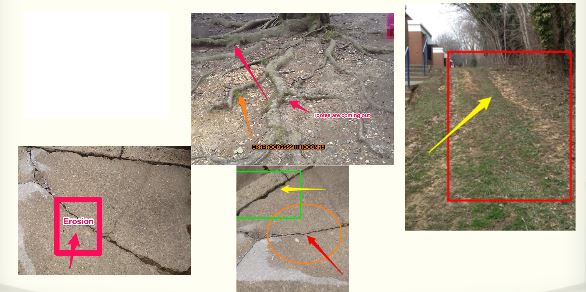
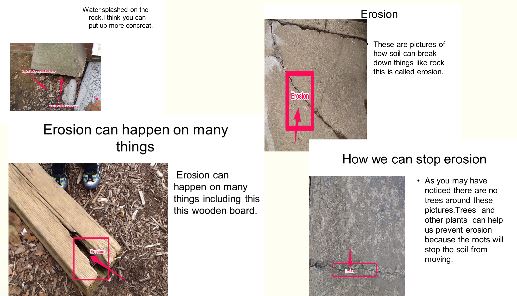
Lois shared a wonderful lesson she did when she was a 2nd grade teacher. After spending a few days learning about erosion, students were charged with the task of identifying erosion around their school building. Students then used Skitch to annotate those pictures: using arrows to draw attention to what they saw, using text boxes to explain what they saw and using other drawing tools (circles, squares) to highlight these examples of erosion. Next, Lois had the students import their Skitch images into PowerPoint to make recommendations about what the school should do to improve the school and slow down the erosion.

As we discussed using Skitch, we talked about some good tips like:
  • giving students some “play” time to take selfies and learn the Skitch tools
  • be clear about expectations if taking iPads outside
  • have iPads set up to email images to teacher to use the images with other applications on the computers OR set up Dropbox accounts on iPads for image sharing
  • partner students to promote collaboration
text-mark-up

Another great tip Lois shared was that you can use the blurring tool in Skitch to blur students faces. So if you want to post public pictures of students but don’t want them to be identifiable, you can use this helpful tool to do so!

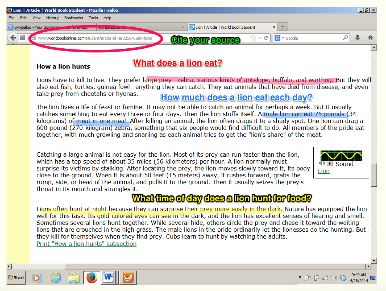
Lois shared another fantastic way to use Skitch which is for highlighting text features. This was a really neat idea where students could highlight topic sentences, add questions they have, or even point out citation information like the URL for the website. More ideas that were shared were:
  • let the students take the selfies and then label (eyes, ears, nose) in a target language (Spanish, French, Chinese, etc.)
  • take pictures of student artwork and have students label skills they are working on (perspective, lines, negative space, etc.)
  • have students make addition stories using counting bears and use Skitch to explain the addition
  • take pictures of primary sources or maps and have students label important items
Have your own ideas about using Skitch or questions about how to use Skitch? Leave a comment below!!


Monday, February 18, 2013

Meeting #4 Virtual Book Club - Add Your Voice!

Looking forward to our fourth meeting of the Virtual Book Club discussing Flattening Classrooms, Engaging Minds by Julie Lindsay and Vicki Davis Monday, February 18th at 7:30pm EST (that’s Tuesday, February 19th at 12:30am GMT). For your time zone, click here. We will be discussing Chapters Seven and Eight.

Add your voice to our group! Use this link (https://sas.elluminate.com/m.jnlp?sid=2007066&password=M.065891D192F8072208BF5756999CE0) to log onto the live session or watch this space for a posting of the recording afterwards.

We have had some powerful conversations so far about digital citizenship (see The Making of Digital Citizens), building and maintaining a Personal Learning Network (see Launching into a River of Information), and starting and joining global project (see The Virtual Book Club Has Launched).

This is a community of teachers sharing with teachers: reflecting, listening, sharing, questioning. Join us!

Wednesday, June 20, 2012

Fine 'Tooning


with Toontastic

One of my favorite things about the iPads and the apps that have been developed for them is the opportunity for students to show what they know in new and creative ways. A great example of this is the app Toontastic.

Toontastic is a story-telling app. Its stand-out feature from other story-telling apps or software is that it provides the skeleton for the basic elements of a story – setting, conflict, resolution and conclusion. What happens is that when you open the app, you are invited to make a new cartoon. As you do so, the app displays a visual of this story arc. This encourages the author or cartooner to consider more than just how the story will start, but how the story will build and then be resolved. I love this aspect since we’ve all seen too many digital stories where the visuals are wonderful but the story-telling is lacking.

Another great aspect of Toontastic is that it is scaffolded in a way that a very young child could use it with very limited support (ask my 5-year-old about this). However, it is also sophisticated enough that a high school student can tailor the app to fit his or her creative ambitions (ask the ninth and tenth graders I worked with last week). The scaffolding happens this way: there are already scenes drawn for you and animated characters created that you can choose. For instance, you can select a pirate boat, desert island, and ocean scene with pirates, sharks and crabs. This is great for simple story telling, again, ask my son who has made endless stories about these pirates. Or, you can draw your own scene, tailor the animated characters or create your own characters. This is what the high schoolers I worked with did to describe the four agents of erosion. They amazed me with the sophisticated drawings they made or the creative decisions they made about designing their own characters that they could animate.

From an educator’s perspective, Toontastic gets five stars for student engagement. When I first introduced Toontastic, I made my own sample story. I had a good time creating it and laughing at myself as I showed it to the kids. They were amused, but what got them to the edge of their seats was when I showed them how I made the little movie. I could see their posture change as they realized they were going to be able to create their own movie using this app. Students would so much rather have the chance to make something original and imaginative than complete a worksheet or watch a dated movie clip.

In addition to the cartooning piece of Toontastic, students can also record their voice and add (pre-set) music to their films. This is one of my favorite aspects of Toontastic but one of the hardest sells for high school students. Some students did a great job with this, writing out what they were going to say, practicing and perfecting it until they were satisfied. Others shied away or avoided this aspect in any way they could manage. As I do more with Toontastic and high-schoolers I think I will do more to get them ready for recording their voices. I hope that in the future, we can create instructional cartoons that we would show to a younger grade level to teach a concept. I work with a number of bilingual students and it would be so great if they would make ‘Toons in their home language that could be used in classes with native speakers.

One other take-away from my first go ‘round with Toontastic had to do with saving work. Toontastic saves the settings each student creates and even the story they are working on, which is great. What is tough with iPads though is that when the next class sits down to use them, they can see all the previous classes’ work. Actually, seeing it I don’t mind at all, deleting it, I mind a lot. On our first day we had two different students delete other students work. I was devastated when I realized what had happen. Those first kids had worked so hard, only to have it gone by the end of the day. This helped me learn a few things:


  1. Be sure to know which student is using which iPad – whether this is through a sign-out sheet, permanent assignment of iPads or another system, accountability breads responsibility
  2. As soon as a student feels their ‘Toon is done, upload it to the Toontastic website. Toontastic has a website associated with their app where all the ‘Toons can be viewed. Once the ‘Toons are up there, only the teacher can delete them.
  3. Be clear about expectations with the iPads. I feel we had done a good job talking about handling the equipment safely and staying on task, but I had not been specific about respecting other students’ work. I am now. *smile*


The other lesson learned is the same lesson I learn over and over again.

Be clear about expectations for the assignment


Our first try with Toontastic yielded really uneven results. I think that is definitely because there wasn’t a clear assignment sheet explaining what we were expecting. While the classes I was working with were small and we frequently reminded students of what they needed to do, a hard-copy assignment sheet laying out expectations, maybe as a checklist would have made a big difference. I swear, I will always require this of teachers I work with in the future.

I am less certain about the requirement to do a story board or rough draft before jumping into an app. These apps generate so much innovation, I’m wonder if a rough draft would limit the resourcefulness of the students. Students often thought of ways to show the content (agents of erosion, the rock cycle) that they probably wouldn’t have consider until they started using the app. Similarly, they might have had an idea in their storyboard that they couldn’t recreate in the app. I am still debating about this part of digital stories. I feel like more planning would make for better projects, but I’m not sure at what point this should happen. I’m wondering if you let the kids create for 20-30 minutes and then have a check-in point where partner’s review each other’s work and give suggestions. This has the added benefit of students getting ideas from each other and students practicing giving productive feedback.

So, as you can see, I’m still Fine ‘Tooning my work with Toontastic. I would love to hear from you what projects you’ve tried with this app! Or what suggestions you have about how to use it effectively in classrooms. Or, if you teach Kindergarten to Grade 5 and would like to collaborate, with my students teaching your students new concepts through Toontastic!

Tuesday, May 22, 2012

4tVirtual Con Adventures with Digital Reading/Writing Workshop

In addition to collaborating and presenting on The Global Classroom Project (Teachers Teaching Teachers About Global Projects) I was lucky enough to pull together four amazing Language Arts/English teachers to share their experiments and adventures with Digital Reading/Writing Workshop at the 4tVirtualCon. If you've read some of my other posts: Dude, Can You Please Edit and We Have Authentic Voices, you know that one of my passions is using digital tools to give students authentic opportunities to write and to reflect on what they've read. These four teachers are doing it and shared their ideas in this presentation.


I wanted to use this post to share their amazing work. They were all generous enough to also share some hand-outs they use and resources they found helpful. If you have additional resources or if you've blogged about similar topics, please comment here and add your own ideas, links or questions!


Here is a link to the slides from the presentation: http://www.slideshare.net/edtechdunny/dude-canyoupleaseeditss


Read more about "The Students Take Control: Virtual Literature Circles" here: http://elenagreertlpproject2012.weebly.com/index.html


Plus, read this article from Educational Leadership: http://www.educationalleadership-digital.com/educationalleadership/201009?pg=52&pm=2&u1=texterity#pg52 


Read and listen to middle and high school students publishing their work: http://authentic-voices.wikispaces.com/


Resources for trying out character blogs: https://www.dropbox.com/sh/dyiohc9mix4u5or/MZOcLxZON_


Plus this great post from Read, Write, Think: http://www.readwritethink.org/classroom-resources/lesson-plans/creating-character-blogs-1169.html 


Highly recommended reads:


The Digital Writing Workshop by Troy Hicks
Because Digital Writing Matters by National Writing Project, with Dànielle Nicole DeVoss, Elyse Eidman-Aadahl, and Troy Hicks


And, here is the link to our presentation:  https://sas.elluminate.com/p.jnlp?psid=2012-05-22.1458.M.86D4BB880224F640E9607ED9214AC7.vcr&sid=2009317


Wednesday, March 14, 2012

What does family mean to you? What does it mean to your students?

Families depend on each other a lot. They show each other how to handle problems and they show support to each other when help is needed. They show how to set goals and they care for one another...
"A day my sisters had to depend on me was on Mother's Day a couple years ago." (read more)
" The person I really depend on is my brother. I just want him to be around when I need him. My mom I really don’t depend on because I know she is going to be here regardless. But my brother…I depend on him because he needs to be here when something happens. I mean my mom can protect me but not like my brothers can or dad." (read more)
"One time that my family depended on me was when my grandfather was very sick because of his diabetes." (read more)
Above are three responses from students about what family means to them. Their Language Arts teacher provided the opening sentences but then the students took it from there. They wrote about times they helped their families, times their families helped them and times their families let them down. Each essay told a new story and shed new light on the nature of families. But the essay also shared commonalities: how connected we are with our families, how our actions impact on families and how our families' action impact us. Read more of the students essays here.

But what we want to know now is:

How similar are families around the world?

We have issued ourselves a challenge. Can we find students from 10 different countries to share with us what their families mean to them? By May 1st?

http://www.flickr.com/photos/stevecadman/134974908/
Will your classroom be one of them?

We would love that! If you are interested, leave me a comment here, contact me on Twitter @edtechdunny, or just go ahead and join our wiki. We can send you more information about how to add your essays to our wiki. But basically, if you can type up your essays, we can add them to our site! Let's give our students a chance to learn about families everywhere and to see a world bigger than their own.


Tuesday, March 6, 2012

Dude, Can You Please Edit?

The last two years I have been lucky enough to work with a group of middle school Language Arts teachers that were interested in implementing a Digital Reading Writing Workshop in their classrooms. Inspired by Troy Hicks'  The Digital Writing Workshop, we met regularly and compared notes about how best to incorporate some of the ideas presented in the book into our classrooms.

One of the brilliant ideas that came out of these early morning gatherings was to use the wiki tool in Blackboard as a digital writing portfolio. This was one of those ideas that was so good, I was mad I hadn't thought of it! This colleague of mine, Teacher Wiki, set up individual wikis within her Blackboard courses for each student. Each student would then create a new page of the wiki for each new writing piece. That meant that each time they revised that page of their wiki, all revisions were saved. Furthermore, because the wikis were all public, all students in the class could read each other's writing and leave specific feedback about each piece. Further, furthermore, students could get ideas for their own writing based on what they read in each other's wikis. A simple and elegant way to help students track their own progress, publish their work for feedback and view examples from their classmates of great writing.

So, as you can tell, I was excited about the use of this tool to truly build a digital writing workshop. But what was even more exciting was the student writing and interactions that came out of this practice.

Teacher Wiki had one student who would type a few sentences and declare himself done. Using all her Teacher College Writing tricks, Teacher Wiki would cajole and needle and work hard to get the student to write more. However, Student Y would just not elaborate or even re-read what he had written. That is until, he got some feedback from his peers.


Dude, Can You Please Edit?


This was shouted across the room at him in a none-too-patient voice from a friend across the room. It was clear that when Student X went to give reluctant writer Student Y some feedback in his wiki, the piece was filled with too many errors. It was after this across-the-room exchange that reluctant writer Student Y quietly asked Teacher Wiki where the spell check function was in the wiki tool. Quietly, surreptitiously, reluctant writer Student Y went back and began to revise and edit his piece. That quick exchange with his peer made more of an impression on him than repeated attempts by his teacher. And I question whether or not the scenario would have unfolded the same way if the students had just exchanged papers. Instead, this is a perfect example of what can happen when students are encouraged to write from the beginning in a digital format.  Editing and revising is so much easier in the digital format but, more importantly, when adolescents get feedback from their peers, they are much more interested in revising than when they get the same feedback from their teacher.

Now, of course, Teacher Wiki works hard on teaching students how to give appropriate and helpful feedback to the writer. (I don't think "Dude, can you please edit" was one of her model examples). She gives students specific ideas about how to respond to other students' writing and highlights model responses. As the school year goes on, students get better and better at giving each other feedback. While they still often slip into casual chat talk, they do give advice about word choice and provide suggestions for adding detail.

When I interviewed students at the end of last year, one students was able to tell me both how he got his writing topic idea from reading other students' wikis ("When I read how that student wrote about breaking a vase, I remembered the time I broke a window."), and how he improved the piece based on feedback from a classmate ("They suggested I use the word 'shattered' when I described the window breaking. I had just said 'broke.'") This was great testimony to the importance of letting students read each other's work in a friendly and open way.

Example of a student adding transitions to her writing
The ability to track all the revisions on a writing piece, have students giving and recieving feedback from each other and creating a space for students to collect more ideas about what and how to write has made using the wiki tool in Blackboard a huge success for these Language Arts students. As more and more teachers experiment with this format, students will benefit. They will grow as writers and as learners.

Thursday, March 1, 2012

We finally got to start using Quest Atlantis last week! If you have never heard of Quest Atlantis before, it is an immersive learning game. Students have avatars and enter a 3D world where they are assigned missions and quests. The missions and quests all are connected to real-world problems and have engaging story lines. Students must navigate the 3D world to find information and clues to solve a problem. Along the way they meet virtual characters who guide the students and provide information. There is also the opportunity to interact with the avatars of students from other schools. The basis of Quest Atlantis is the concept of transformative play. As the Quest Atlantis website explains:
Students who play transformationally become protagonists who use the knowledge, skills, and concepts of the educational content to first make sense of a situation and then make choices that actually transform the play space and the player.
So, I was curious, how would my students react to this 3D space? Would they experience tranformational play? Would they enjoy exploring the virtual world more than they enjoying learning in a traditional classroom?

Honestly, I wasn't sure I would ever find out. The first hurdle to tackle was getting permission slips signed. Because Quest Atlantis is funded by Indiana University and used for research about emerging technologies and learning, students were required to have parental approval before logging into the Quest Atlantis world. Unfortunately, asking parents to sign a permission slip for a class assignment was not a top priority for these students. After a little cajoling from me and some tough talk from their principal, we finally had all the permission slips in. Whew, step one complete.

The first day playing went, well, great. The students were excited. They were laughing and talking and fully engaged for the 30 minutes we let them play. It was fascinating to watch their personalities emerge online. Some went right to finding out their mission and were running off here and there without really absorbing their task or the information given them. Others spent a tremendous amount of time getting their avatar just right. Still others tested the limits of the world and immediately dove off cliffs, swam in the water and tried to get into places they shouldn't. It was all behavior I would completely expect when giving adolescents a new toy. They were experimenting: some with recklessness, some with caution and some just took it as it came.

Day two we began by showing students how to know where in the 3D world they were. Quest Atlantis uses North, South, East, and West indicators for students to know where they currently are and to locate the places they needed to get to. I was pleased that students got the directional concepts but was fascinated to watch them play and realize that they didn't really understand how to apply these concepts. Since we were playing during their social studies class time, I loved that they were absorbing directionality in a whole new way and actually applying it in a way that was meaningful to them.

My other take-away from day two was that my students need help following directions! I guess I always knew that but assumed that they were having trouble following directions because they didn't really care about the assignments or weren't listening to the directions the first time. But watching them play Quest Atlantis, I realized they actually needed help reading carefully and doing tasks in the order assigned to them. Since many of my students have struggled to achieve in traditional schools, this observation wasn't a shocker, but it was still useful to observe it in the virtual world.

The next step with Quest Atlantis will be for the students to tackle content-related missions in the 3D world. Until then I'll be excited about the following things:


  • The school administrator commented that she'd never seen Student X talk so much as she did when playing  Quest Atlantis that first day
  • A student that was going to be absent for Day Two asked if she could play the game at home. (Yes!)

If playing Quest Atlantis means students are excited to learn and want to work on school work outside of school, I'm ready for more!

Tuesday, January 31, 2012

Cooking with Michael Jackson and Beyounce

Adding and multiplying fractions is every sixth graders' favorite thing to do, right? Well, not exactly. What about sixth graders that have repeated the grade? Nope. What about sixth graders still learning academic English? Definitely not fraction fans. Luckily, I did not start my lesson with them telling them we were going to be adding and multiplying fractions. Instead, I told them we were going to make a cooking show!

Now, I had them.

"Is it going to be on YouTube?"

"If you want it there."

"Really?"

"Yep, we just need to leave out your faces and names. What do you want to call it?"

"Cooking with Michael Jackson and Beyounce." I loved it.


Okay, we were ready to start.

The idea to make trail mix using different fraction amounts was not mine but rather from a curriculum guide for our school division. And honestly, I don't think these kids had ever even heard of trail mix before. The idea to do it as a cooking show, was mine. It seemed like a great way to bring in some instructional technology and increase engagement in math class. Technology and, well, food. Sure enough, when I brought out the mini-marshmallows, eyebrows went up and eyes crinkled with smiles.

"Are we going to eat it?"

"Yup."

Now I really had them.

Thank goodness I did, because it was tough going through the math. We reviewed fraction amounts. We looked at the measuring cups I'd brought in. We wrote out how we would need to calculate enough trail mix for the whole class. We guessed, recalculated, wrote out equations and relearned mathematic vocabulary. I repeated myself, a lot. The kids held their heads in their hands at times, sighed heavily at other times.

But finally, we got to the part the kids were waiting for, we started filming.

After a couple rehearsals I got out one of my favorite instructional technology tool, the simple-to-use-yet-powerful, Canon Power Shot. Kids that had recently been overheard in the halls shouting and loudly laughing, suddenly got very quiet and shy

and forgetful.

We went through three shots of the same scene. My one sweet (that day) little guy could not remember how to explain finding the common denominator. I stopped him.

"Do you want to write out what you are going to say?"

"Please." (He said please!!! He is going to write.. voluntarily!!!)

Success! Our next take was a keeper. And building on our success from that one, we wrote out more of our script. Before we knew it, we had finished and good thing because the bell was about to ring.

"Will it really be on YouTube?"

"By the end of the day" I promised.

And it was. Here is a link to it if I've gotten your curiosity up: Cooking with Michael Jackson and Beyounce. Do not expect perfection. Expect mistakes and misspoken words. I'm okay with that. It is not the product that I'm proud of.

I'm proud of Michael Jackson who showed more persistence with an academic task than I had ever seen before. I'm proud that he said the word denominator at least 35 times - probably more times than he had ever said before, total.

I'm proud of Beyounce who showed patience and restraint while Michael Jackson practiced. She was helpful and supportive and kind. She still mixed up subtraction and division, but she definitely had a better understanding of fractions than she did at the beginning of the lesson.

So, a camera and YouTube. That's what made a difference for these kids that day. The idea that something they would produce could be shared with the world. This public audience gave them a reason to relearn fractions. I gave them motivation to stay after a hard problem. Recording their voice for the world forced them to practice, rehearse, and, in turn, learn the concepts more differently.

Well, that and mini-marshmallows.

Friday, November 25, 2011

Save the Pacific Tree Octopus!

We have all heard the dire predictions about the Internet making students dumber. I bristle at these accusations; the medium through which students access information has very little to do with their intelligence.  And this is the wrong focus anyway, as it’s not about being smart or dumb; it’s about becoming a strong critical thinker. And what’s needed to do that is teachers and classrooms that get students to think more deeply about what they read, whether it be a book, a newspaper article, a website, a viral video, or even an encyclopedia. Students have always needed help being critical readers and critical consumers.

This is why I love lessons that get students thinking more deeply about what they see and read on the Internet. A teacher that I am lucky enough to work with developed a brilliant and simple lesson that could be used in a number of different subject areas and across different grade levels.

Here is what Mrs. D did:

1)      Have students go to a website that contains false information. There are a number of great sites that do this well. One of the most engaging (and amusing) is the Pacific Tree Octopus website. This website contains great graphics, links to YouTube videos and convincing pleas to help the “endangered” Pacific Tree Octopus.
2)      Ask students to take notes on some basic facts about the subject of the website. Mrs. D. asked students to record important information about the Tree Octopus and then discuss with a table partner.
3)      Have students compare what they learned on the first website with a site that is edited like World Book Online or Britannica Encyclopedia. Mrs. D.’s students were very confused when they went to the World Book Online and couldn’t find anything about the Pacific Tree Octopus. At first they thought they hadn’t typed the term in correctly, then they were concerned that World Book Online must not have complete information. Students were not yet suspicious about that cute little Pacific Tree Octopus.
4)      Ask students to try a second site to confirm the information from the fake website. Mrs. D.’s students were relieved when they saw that Wikipedia had an entry about the Pacific Tree Octopus. However, on closer reading, the students realized that the Wikipedia entry referred to the Pacific Tree Octopus as a hoax. This is the fun part of the lesson. Students all react in different ways. Some laugh, some are mad, some tell you that they knew all along. Teachers should be ready for all of these reactions, but should also be clear that the original site was a fake.
5)      Ask students why they believed the Pacific Tree Octopus was real. Mrs. D. was shocked by how her students answered this question. Students replies included:
“It was on the Internet”
“You could give money”
“I saw one before” (my personal favorite, we have all taught this kid, haven’t we?)
“There was a video”
“There were pictures”
“There was such detailed information”
6)      Revisit the lesson with students the next class. Mrs. D. asked students to recall what they learned from the Pacific Tree Octopus lesson the next time they came to class. Students shared insights along the following theme:
“You can’t believe everything you read on the Internet”

What I love of Mrs. D.’s lesson is that it isn’t drawn out. It doesn’t take long to do. It is repeatable. Any teacher can do it. Schools could easily repeat the same lesson with different websites year after year until the message becomes crystal clear to the students:
“You can’t believe everything you read on the Internet.”

Someone who has done excellent work on this topic is Donald J. Leu of the University of Connecticut and his New Media Research Team. Dr. Leu and his team are working to collect research about the reading comprehension skills needed to be a successful reader in the 21st century. Furthermore, they are investigating how to best support students in order that students may become thoughtful and informed users of Internet information.

If you are looking for similar websites that could used in the same way, here are some good ones. I have also created a Diigo group called Critical Literacy Resources to collect more. Please feel free to join and suggest your own. Or leave a comment below about similar lessons or lesson ideas you have.

Dihydrogen Monoxide Research Division - beware of exposure to this chemical!
All About Explorers - did you know Christopher Columbus was actually born in Australia?
Martin Luther King Jr. – A True Historical Examination Much more serious site for examination of bias and deception. This website is hosted by David Duke's foundation. Suitable for middle school and high school students with careful preparation and debriefing.

Thursday, November 24, 2011

Making Connections: Reading Aloud with a Purpose


Why create a Digital Talking Library?
“The single most important activity for building the knowledge required for eventual success in reading is reading aloud to children.” -- Richard C. Anderson, Elfrieda H. Hiebert, Judith A. Scott, Ian A.G. Wilkinson, Becoming a Nation of Readers: The Report of the Commission on Reading (Champaign-Urbana, IL: Center for the Study of Reading, 1985), p. 23.
This is striking isn’t it? Read it again. Reading aloud is the single most important activity we can engage students in to build successful readers.

http://www.flickr.com/photos/mikenan1/118458606/
Reading aloud is a joy in my house. We read the same books over and over, we read new books, we read classics, we read chapter books, we read pictures books, we read from the Kindle App, we listen to books on CD from the library, we go to story hours.

But that’s my kids, what about the students I teach? What about my kids’ peers and friends?

Who is reading to them?

Considering this gap between those who know well the pleasure of listening to a story come to life as it is read aloud and those who have no such association, I decided that the middle school and high school students I work with would create a Digital Talking Library for an elementary school.  We would work to build a wide selection of audio books that these elementary students could learn to treasure much the way my own kids adore their books on CD.  To make the experience as rich as possible, we would not just record ourselves reading books, we would create a digital think aloud. We could model reading strategies as we read the books aloud.

We would make a Digital Talking Library so that the older students could model fluency, vocabulary and self-monitoring strategies.  In addition, by creating Think Alouds instead of Read Alouds our project would more closely align with fair use principles and copyright policies. We were creating this digital library as an instructional strategy. We weren’t doing it to replace commercial products.
I also knew that the secondary students needed help internalizing reading strategies. The fact was, most of these students also needed to work on their fluency, vocabulary, and self-monitoring strategies.  My readers were students who were, for the most part, reading well below grade level.

And as it turned out most of the "big kids" hadn't been read to much either.

When I brought in the stack of high-quality children’s literature for them to read aloud there was barely a glimmer of recognition. That’s right, I had a 7th grader look at a stack of fabulous picture books by Kevin Henkes, Cynthia Rylant, Bernard Waber, Vera Willaims, and Helen Oxenbury and tell me that he didn’t recognize any of them. His eyes were cast downward and he mumbled that he never read much as a kid. It hurt my heart to realize just how little he knew about the enjoyment of reading. It was then that I realized this project was going to be as valuable for my “big kids” as it would be for the kids that got to listen to the finished products.

How we went about creating a Digital Talking Library

To select books, I coordinated with an elementary literacy coach and an elementary classroom teacher. We brainstormed a list of children’s books that would make for excellent read alouds and excellent think alouds. We looked for books that most teachers would have copies of in their classroom libraries so that students would have a text to look at while listening to the books. Once I had 15-20 titles that seemed promising, I gathered hard copies up and brought them to my “big kids.”

http://www.flickr.com/photos/kakachu/2569536716/
The Language Arts teacher and I shared the project idea with the middle school and high school students. We discussed how good readers make connections while they are reading and described text-to-self, text-to-world, and text-to-text connections. We gave several examples and then gave the kids a stack of Post-Its and let the kids at the pile of books.

I was definitely surprised at how difficult it was for students to make connections to the children’s books. This wasn’t because the texts were children’s books, it was because these high schoolers and middle schoolers definitely needed help being metacognitive readers. It took a great deal of prompting and prodding to get them to identify connections they could make to the text. It took more work to get the students to be able to elaborate on their connections in such a way that it would be meaningful for the elementary students who would be listening. For instance, when reading Dr. De Soto by William Steig one student expressed that he couldn't think of any connections. His teacher and I asked if he'd ever been to a doctor or a dentist. He was then able to say "This reminds me of when I went to the dentist." So then we asked him about how it feels to go to the dentist and what he'd been thinking about. Then he was able to elaborate, "This remindes me of how scared I was when I had to go to the dentist and I thought it was going to hurt." As we continued in this process, students were able to realize that they could be making connections as they read and that doing so is part of being a metacognitive reader.


http://www.flickr.com/photos/beth19/4843479723/
 What didn’t surprise me and was another important piece of this project, was that the middle schoolers and high schoolers had lots of pronunciation and definition questions about the vocabulary contained in the picture books. A few of our English Language Learners worked hard to get the phrasing and the words right. I remember the pronunciation of “relative” was especially tricky in Cynthia Rylant’s The Relatives Came. One sweet 7th grader worked hard on getting the emphasis on the correct syllable. This project might be one of the first times anyone ever gave him feedback and a chance to hear his pronunciation versus the Standard English pronunciation.

We used Audacity (free audio editing and recorder) to record the students. It was great seeing how swiftly the students became accustomed to the ins and outs of Audacity. They quickly learned how to record, pause, playback and start a new track.  Something I look forward to as we revisit this project is having students do more of the editing themselves. I would love to assign one or two students to be editors and teach them how to merge tracks as well as add the introductory and concluding musical track we created using freeplaymusic.

Plans for more Digital Talking Libraries

I’m looking forward to building on our small Digital Talking Library again this year. The Language Arts teacher and I are working on finding some tighter content connections this time around. Since myths and folktales are a consistent part of the Language Arts curriculum, we want to target some fantastic children’s literature that highlights myths and folktales (The Gods and Goddesses of Olympus by Aliki and The Three Pigs by David Wiesner). Or, we might look at children’s literature that discusses content from other subject areas (The Story of Ruby Bridges by Robert Coles and The Story of Abraham Lincoln by Patricia A. Pingry)

Having witnessed how much guidance students needed with making connections to the children’s books, we know we want to continue to use the read alouds as a chance to develop more reading strategies. We hope to create 10-15 digital think alouds for each of the following reading strategies: visualization, inference, questioning.

Finally, I am hoping to reach out to a wider group of elementary school teachers to find out the impact the project is having on the elementary school students. I was thrilled that the First Grade Teacher I partnered with had her students write thank you notes to the “big kids.” These notes were precious in their sincerity and frankness. It was a great authentic writing assignment for her students and powerful validation for my “big kids.”

Summing it all up:

  • All kids need more opportunities to hear stories read aloud and to read stories aloud
  • Adolescents who are reading below grade level have a great deal to gain from creating think alouds of children’s literature
  • Adolescents will self-monitor more often and more accurately when creating a read loud that will be used by real children
Great Resources about Reading Aloud:

Friday, November 11, 2011

We Have Authentic Voices

but we are still looking for authentic audiences...

Authentic Voices was launched slightly less than one year ago. It was inspired by a comment made by Cornelius Minor during a presentation for Teachers College Reading & Writing Project. When a teacher asked about how to keep kids motivated to write in a culture where writing isn’t “cool,” Cornelius replied, “You make it cool.” He talked about kids recording themselves reading their stories and posting it to YouTube. He described how kids were inspired by other kids who were willing to put their writing “out there” and how it motivated them to publish their writing too. Additionally, I had been reading Troy Hick's The Digital Writing Workshop and listening to Paul Allison and Chris Sloan's podcasts Teachers Teaching Teachers.  Discussing all of these influences with a few dedicated, talented teachers, we realized we could create a space to celebrate and publish student work. A space where students could feel their writing mattered and was important.

Wikispaces was still a relatively new content-creation tool for me but it seemed like it would fit my purposes: a site where we could upload student work of all formats (text, voice, and video) with a moderated space for comments about the students’ writing. There are probably hundreds of other ways we could have set up Authentic Voices but in the interest of avoiding analysis-paralysis, I went with a tool I found accessible and manageable. Thus, Authentic Voices was launched.

My Name was the first student piece added to Authentic Voices. Working with this student taught me so much about the potential online writing spaces have for developing student voice. After showing Deandre how to enter the text to his poem and how to record himself using Audacity, Deandre asked me, “Is it alright if I change my poem?” Well, as any Language Arts teacher will tell you, getting students to revise their work is often the most challenging part of teaching writing. I was thrilled that, given to opportunity to publish his work, Deandre was noticing that parts of his poem could be improved. But I played it cool to Deandre, “Yea, if you want to, you can change it.” Deandre edited his piece five, yes that’s right, five separate times. Much of Deandre’s revisions had to do with the interplay of reading his piece out loud and listening back to his recording. As he heard himself reading his poem, he could understand how words could be changed and moved around to improve his meaning. His writer’s voice got stronger. After about nine different attempts at recording, Deandre finally pronounced his work done. Listen to the results yourself. This young man embraced writing and his voice.

Since that time I have had the opportunity to work with a number of other young men and women as they took a piece of writing and breathed their voices into it. Not every student took as much time as Deandre to edit and revise. Some students improvised as they recorded their piece and never went back and changed the written words. Some students made one recording and declared it perfect. But one thing remains consistent. Students are empowered by having their writing taken seriously. Students would grab me in the hall and say “I wrote something else, can I put it on Authentic Voices?” I would write out the website on the back of my business cards (at least they are good for something) and students would grin shyly, put it in their pocket and tell me their grandmother might want to see it.

Authentic Voices has an Authentic Audience. According to our wiki statistics, we get thirty to forty hits every month from countries around the world. Students are amazed to think that someone in another country has read and listened to something they wrote and that is keeping them motivated to write for the time being.  But I am hungry for more. I know that the power of publishing your work to a public forum will fade without authentic feedback. We want to know what people think when they listen to our work. We want to know what connections they have with what we have written. We want to know what our work makes them wonder about.

This is why I will keep reaching out to global learning communities through groups like the Global Classroom Project, Global Education Collaborative, and through tweeting my heart out. I know that there is a classroom down the street or Down Under that will join us soon. I look forward to the day when I blog about the interactions between our students and students from another place and culture that make connections as writers, authentically.

Thursday, November 10, 2011

Can You Grant Me a Divorce?

Teaching the Reformation to 10th graders isn’t the easiest thing. Teaching the Reformation to 10th graders at 8 o’clock in the morning is even more challenging. Teaching the Reformation to 10th graders at 8 o’clock in the morning the day after Halloween maxes out the teacher challenge index. Luckily, this teacher had an iPad with her.

This week I got to hang out with a great Social Studies teacher and her 10th graders as they took on the task of creating a talk show script about the Reformation. The task was to demonstrate what they knew about the Reformation by creating a dialogue between Henry VIII and the Pope. The teacher could have just required that the students submit a written script. She could have also required that the students perform their scripts in front of the class. What she decided to do instead was try out an iPad app called Puppet Pals.

Puppet Pals allows you to create a video by dragging in characters, selecting a background and recording your voice while manipulating the characters and setting. The result is a captivating original movie. The free version of Puppet Pals comes with a few characters and backgrounds but for $2.99 you can purchase the director’s pass which gives you 8-10 different sets of characters and backgrounds, including, to our delight, a talk show set! The Director’s Pass also gives you the option of creating puppets and backgrounds from photos you’ve taken or photos you’ve saved from the Internet.

I wanted the students to be able to play with the app right away so I went ahead and searched for fair use friendly images of Henry VIII, a Pope, and some other Reformation-relevant figures (thank you Advanced Search in Google Images). The teacher introduced the assignment and we pulled out the iPads. I briefly created a silly little practice movie so they could get the idea of how the app worked. I then showed a more serious example similar to their assignment that I had made about Buddhism and Confucianism (also reviewing a concept from earlier in the year – yea!). The kids were smiling and laughing, something I love to see when a new assignment is explained.

The students took a full class period to write their scripts. The teacher worked closely with them to be sure they were accurate in their writing and to encourage them to create a script that felt like a talk show. Then, they were ready to record.

Some observations while they recorded:
  • Stakes are higher for students when they care about the product.
  • These students rehearsed a few times before ever touching the iPad – unprompted.
  • Once they were recording “live,” students often took several “takes” of the video before they were satisfied with the results. It was normal for students to record 2-3 times before agreeing the movie was good enough.
  • Vocabulary terms are actually absorbed when the students use them for themselves.
  • More than once a student asked how to pronounce a word they had included in their own script. “Heir” and “annul” were words they had seen in their reading and they knew enough about to include in their script, but it was when they had to pronounce it and read it with meaning that the students started to really own these vocabulary words.
Students worked collaboratively and had fun.
  • I never overlook the importance of students enjoying what they are doing. Smiles and laughter just make for a more pleasant learning environment.
  • I can’t wait to see if this topic is something that these students can remember better later in the year due to their high interest in the assignment.
  • It was lovely to see students encouraging each other and asking for help as they acted out each other’s script.
  • As I was leaving, I watched a young guy rewrite his script in neater handwriting so that his partner would be able to read it. I’m wondering how often he rewrites his tests papers so his teacher can read it better?

Tips the students would share:
  • Practice before recording.
  • Practice moving your characters around so that it looks like they are really talking.
  • Use the pause button to catch your breath between lines without losing flow in the movie
  • Press stop before trying to save – otherwise the app crashes!
  • Save, save, save.
  • Create a story that contains something you can relate to (this tip is actually from my 8-year-old who adores this app!).

Click here to view one student's work: Can You Grant Me a Divorce?