Pages

Sunday, January 6, 2013

Website of the Week #1

Hoping to make this a new habit. There are so many great websites out there that I often forget what some of the great ones are! I am hoping that by posting just one a week (I'm also email blasting my teachers these) I will be able to share some great resources, remind folks of great resources, and have a nice catalog of some of my favorite sites when I want to put together a presentation or just make a recommendation to a colleague. And my hidden agenda is that maybe this will get me posting to my blog more often. :) So here is the inaugural....

Website of the Week #1


http://www.sweetsearch.com/
Tired of students going to Google for all their research? Try SweetSearch: http://www.sweetsearch.com/

Sweet Search uses only the 35,000 Websites that their staff of researchers, librarians and teachers have evaluated and approved. This helps students find good information faster. Consider recommending this site to students for all their research!

Have you had good luck using Sweet Search? What do students think? Would love to hear your stories!

Saturday, January 5, 2013

Countdown to First Virtual Book Club Meeting!

The Virtual Book Club will begin a short 48 hours (-ish) from now! It has been so much fun to see folks begin to post on the Virtual Book Club blog, tweet comments on the book, email with ideas or even call when they had a question. One of the wonderful things about a global Professional Learning Network (PLN) is that you have colleagues and friends from all around the world sending you great snippets of wisdom and encouragement at all times of day. Thank you everyone for your active participation already!

If you haven't already, a quick reminder to make sure you computer is ready for our first session on Monday, January 7th, 7:30PM EST (that's Tuesday at 3:00AM GMT), for your time zone, click here. To check your computer, go to this page by Blackboard Collaborate, it lets you check your computer to make sure you have all the software you need.

The link you will need to join the session is: https://sas.elluminate.com/m.jnlp?sid=2007066&password=M.065891D192F8072208BF5756999CE0

Please plan on logging on 20 minutes or so before the start of the book club so that you can make sure all is working and complete the Audio Wizard before we get started. If you haven't used Blackboard Collaborate yet, you'll find it is a great tool and pretty easy to use, but you'll want some time to explore it before we get started.

Anyone who can't make our first meeting or has some ideas to share before then, feel free to begin commenting on Chapter One or Chapter Two. We have some folks from time zones that can't make the live meeting but will be following our conversation through this blog.

Thursday, November 29, 2012

Seeing Auras, Through Aurasma, That Is!

I've been hearing a lot about augmented reality in the last few years and it's been hard for me to imagine how it could work in classrooms. Luckily, some great teachers I work with began to pave the way. My science teachers came to me to show me the app Aurasma (Lite). Aurasma lets you add augmented reality layers to any trigger image you choose. The science teachers wanted to use it to have a video play once students were finished reading an article.


It went like this.

The students read an articles on bees from a physical piece of paper. They took notes and did some great reading strategies while reading the article. When they were done, they picked up an iPad, opened the Aurasma Lite app, and hovered the camera over the photograph in the article. And then,

Abracadabra!

A video appears in place of the photograph. (Commence oohs and aahhhs) Not forgetting that the point is to have the students then learn more from the video that has been magically summoned by the technology gods, students were to record new facts about the topic (bees) that were covered in the video but not in the article.

Talk about raising student engagement.

Students that hadn't read the article, suddenly buckled down and began reading.

Students that had been FAR off task, took on leadership roles and began showing other students how the app worked (and discovered some things the science teachers and I hadn't tried yet!)

It was a great class and a fun way to use the app.

But I want more.

What if students recorded themselves doing a book talk and then used the cover of the book as the trigger image? Anyone with access to the app could scan the cover of the book and then watch the students' book talk.

Or what about once a student has completed a work of art? They could record themselves discussing what what challenging about the piece or what ideas they were trying to convey.

I'd love to hear from other educators about how they've used this app or how they envision it being used. I love the idea of a school covered with augemented realities that show off student work in a multitude of formats and media.

In the mean time, Aurasma has great tutorials and guides to get you started, check out Creating Your Own Auras on Aurasma.com

If your interested in creating a lesson like the science one described above, see my post Augment Your Own Reality.

Augment Your Own Reality

The world of augmented reality continues to amaze and astound me. Below are some directions for how you can create your own augmented reality experiences for your students. For a simpler process, see my post, "Seeing Auras, Through Aurasma, That Is." Below is a way to link trigger images (like a photograph in a book or article) with educational videos (from YouTube or elsewhere).


These instructions might seem long but the process is really quite simple and the website is very intuitive.


1. Set up a (free) account with Aurasma Studio.
  • Go to http://www.aurasma.com/partners/advertiser
  • Use your name for “Company” as well as for “Contact Name”
  • Submit the form
  • It will take 1-2 days for Aurasma to get back to you with a username and login.
2. Once you get your login information from Aurasma, go to https://studio.aurasma.com


To make an article with a video aura:


  1. Find an article you want to use.
  2. If the article already has an image in it, right click on the image and save it in a location where you can find it again.
  3. Find a video you want to use.
  4. Download a copy of the video by using a website like KeepVid (http://keepvid.com/) or by downloading a program like aTube Catcher (http://atube-catcher.dsnetwb.com/video/)

Creating a channel:

  1. 1. Go to https://studio.aurasma.com and login
  2. Click on Channels

Adding the image for the aura:

  1. Go to https://studio.aurasma.com and login
  2. Click on Trigger Images
  3. Click on Add
  4. Give the image a relevant and concise name
  5. Browse for the image file
  6. Click on Close

Adding the video for the aura:

  1. Go to https://studio.aurasma.com and login (if you aren’t still logged in)
  2. Click on Overlays
  3. Click on Add
  4. Give the video a relevant and concise name
  5. Browse for the video file
  6. Click on Close

Making the aura:

  1. Go to https://studio.aurasma.com and login (if you aren’t still logged in) 
  2. Click on Channels
  3. Select your channel
  4. Click on Add Aura
  5. Click on “Aura details”
  6. Give your Aura a hame
  7. Select the trigger image
  8. Click on Overlays
  9. Select he video you want to display
  10. Make necessary adjustments and click on Save
Your Aura is now accessible!


Monday, November 19, 2012

Launching a Virtual Book Club

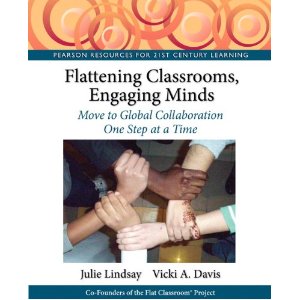
I am giddy with excitement about the opportunity to host a Virtual Book Club discussing the fantastic book Flattening Classrooms, Engaging Minds: Move to Global Collaboration One Step at a Time by Julie Lindsay and Vicki A. Davis. The book club was announced last Sunday night in my school division and I am thrilled that we already have thirteen teachers signed up! Even better, we have teachers from across our school division and from all different grade levels. It is a wonderful thing when already busy teachers find time in their lives to discuss powerful educational ideas with their peers. 

Now, I am ready to get some global participation in this book club. I can't think of a better way to brainstorm about global projects than to have teachers from across the globe in the session together. So, we are inviting all teachers, parents, students, thinkers and learners out there to join us for six live meetings to share what they think about the projects, resources, and research discussed in Flattening Classrooms, Engaging Minds.

We will be meeting on Tuesdays at 00:30GMT (Mondays at 7:30pm EST)

(find the time in your country/time zone here)

on the following dates:

January 7th - Meet the Flat Classroom, Chapters 1 & 2

January 21st - Connection and Communication, Chapters 3 & 4

February 4th - Citizenship, Contribution and Collaboration, Chapters 5 & 6

February 18th - Choice and Creation, Chapters 7 & 8

March 4th - Celebrating, Designing, Managing a Global Project, Chapters 9 & 10

March 18th - Rock the World


Meetings will be live using Blackboard Collaborate and will last one hour. We will spend the time sharing thoughts about ideas raised in the book. It will also be a great opportunity to connect with other educators that share similar passions and beliefs about flattening our classrooms walls. We will share strategies and resources for building those 21st century skills like collaboration, communication and creativity in authentic ways.

Inspiration for this Virtual Book Club came from Julie Lindsay and Vicki Davis themselves. I was lucky enough to participate in a Virtual Book Club hosted by Engaging Educators last spring. It was great because I
  • actually read the book (instead of the book just staring at me from my book shelf, desperate to be read but collecting dust instead)
  • met educators from across the United States and around the world
  • learned about global projects that already exist that I could participate in
  • was inspired to do more to help students and teachers connect and collaborate
I hope that you can take some time to read the book and join us for our discussions. If you are interested, please complete this quick form so that I know you are interested and I'll get back to you with information about our first meeting. And, please, spread the word!

If you aren't familiar with the idea of a virtual book club or with this text, here's more!

What is a Virtual Book Club?

A virtual book club is one in which readers come together to discuss a text using a web-based platform. Readers connect by logging onto a website in which they can be active learners and collaborators. The virtual room allows readers to speak, listen, chat and read about what others think about the text. All participants need is a web link, a computer with access to the Internet (and preferably a working microphone) and thoughts and ideas about the reading. It is like a book club but you can stay home and be in your pajamas!

What book will we be reading?

We will be reading the text Flattening Classrooms, Engaging Minds by Julie Lindsay and Vicki Davis. This book is co-written by classroom teachers that have transformed learning in their classrooms by communicating and collaborating with other classrooms around the world. Learn more about how global learning provides authentic literacy experiences, gets students engaged in their learning and opens up numerous opportunities for differentiation.


Thursday, November 1, 2012

Launching Digital Writing Month

So, two happy events collided today.

Today my presentation for the K12 Online Conference went live. I feel so fortunate to be selected to present and to be included with such amazing presentations as Tiana Kadkhoda's Kids Teaching Kids and powerful learning ideas as Ben Rimes Video Story Problems. If you haven't watched either of these yet, you absolutely should. Tiana makes a poignant case for why we need to turn the tools and the content over to kids more and let them lead us towards transformative instruction. You won't think about teaching math the same. In a similar spirit, Ben Rimes shows us how turning on the camera on our phone can lead to engaging story problems that students will love solving. And, that once students see a few of these, they will take off with creating their own. Both of these presentations will get you thinking more and more about where student voices are in your classroom or your school.

Authentic Voices has been a place where I have tried to help student voices be heard. In a previous post, Learn. Share. Remix. Joining the K12 Online Conference I go into more detail about my presentation, but here (ta-da!) is the link to the live video:


Today is also the beginning of Digital Writing Month. I personally have set a goal of posting something to my blog everyday for the month of November. I have no idea if that will get me to the suggested 50,000 words, but I can't wait to find out! I love this idea of folks all over, with differing interests, writing styles, opinions and ideas all just trying to get their ideas out there and published. While I wish I had prepared and gotten an English/Language Arts teacher or two to participate with me, I know that by just trying myself, I'll get some buy-in from them in the future.

So, today I got to share the inspiring work of students who have put their voice to their very personal writing and have published for the world to see. And, I start my own efforts to put my own voice out there more frequently and more openly.

A good day.

Thursday, October 18, 2012

Learn. Share. Remix. Joining the K12 Online Conference


“Our deepest fear is not that we are inadequate. Our deepest fear is that we are powerful beyond measure. It is our light, not our darkness that most frightens us… Your playing small does not serve the world.”  -- Marianne Williamson

I am so excited to be a part of the K12 Online Conference this year. The theme this year is Learn, Share, Remix with four substrands: Getting Started, Visioning New Curriculum, Kicking It Up a Notch and Student Voices. I am thrilled to be sharing stories about Authentic Voices as part of the Student Voices strand.

If you haven’t participated or “attended” the K12 Online Conference before, you are in for a treat. Everyday for two weeks at 1pm (GMT) four video presentations are launched. Each video needs to be under 20 minutes and related the the conference strand. There are a number of different presenters hitting on topics as varied as Immersive Gaming, Social Media, involving parents and delivering professional development.

For my presentation, the hardest part was choosing which voices from Authentic Voices to share. For me, every post on the wikispace has a story to tell. I remember each student: how they responded to recording their work and publishing it, what was happening in their lives and how writing became a successful moment in their learning day.  But I forced myself to choose just four pieces that seem to represent the breadth of writing on the site and highlight different powerful aspects of the project. I hope my listeners enjoy the selections I play.

In addition to sharing student voices, I wanted to emphasize three themes:
  1. Recording leads to revision
  2. Authentic audiences help writers bloom
  3. Finding collaborators is challenging but worth the effort
I believe these are the heart of this project and can be applied to a number of different kinds of projects across subject areas, ages and classrooms with differing access to technology.  If you tune in, please leave me a comment and let me know what you learned, what questions you have, and what ideas you have to improve the site.

After watching the keynote address by Kevin Honeycutt I was both inspired and completely intimidated. His video captured enthused students building an Apollo 13 museum interspersed with his poignant and passionate appeals to make education engaging, powerful and meaningful. I was scratching down quotes during the whole video and more than once rewatched a segment to make sure I captured his points. If you haven’t watched it yet, here it is, watch it. And then follow him on Twitter and get further inspired.


With the same breath that felt inspiration from Kevin Honeycutt, I felt desperation about my own presentation. I realized that my video would be posted as part of the same conference! What did I think I was doing? While I am passionate about Authentic Voices and the experience it provided for students I work with, my work is no where near the same level as what Kevin Honeycutt has done. What’s worse is that the video itself is certainly amateurish and basic (just installed Camtasia days before!). How will I hold up? Should I withdraw? Plea for another week to edit my presentation?

Then I remembered, part of Kevin’s message is that we have to keep trying. We have to keep putting ourselves out there. It is time to not just consume the ideas of others but to contribute to the movement of making educational technology part of school reform. My project might be small and my presentation might lack finesse, but keeping it to myself does not serve my students well or serve anyone well. Which brings me back to the opening quote by Marianne Williamson,

“Our deepest fear is not that we are inadequate. Our deepest fear is that we are powerful beyond measure. It is our light, not our darkness that most frightens us… Your playing small does not serve the world.”

So, I am repeating this quote to myself and breathing deeply.

I am excited to be a part of something big and not over-thinking my own contribution.

I am thankful to be included and not second guessing whether or not I’m worthy.

And I am joining the conversation.

Learn. Share. Remix.